Focus Calibration
Works out the best AF Fine-Tune value from sets of shots you take at different values.
Available in File ModeYes, in File Mode.
FoCal can’t control the Z5iic, so you take a set of shots at different AF Fine-Tune values and FoCal works out the best one, with separate wide and telephoto values for zoom lenses.
And FoCal can check the rest of your kit.
Supported in FoCal 6.1 and later, in File Mode. Tests: AF Consistency, Aperture Sharpness and Dust Analysis.
FoCal can’t control the Z5iic, so these run in File Mode: you take the shots and FoCal analyses the files.
Works out the best AF Fine-Tune value from sets of shots you take at different values.
Available in File ModeHow repeatable is the Z5iic’s autofocus? Defocus between shots in one or both directions and see.
Available in File ModeWhat happens to sharpness as you change aperture, and which aperture is the sharpest.
Available in File ModeCount the dust spots on the sensor and see how much they matter, before you decide on a clean.
Available in File ModeSave hundreds of the Z5iic’s settings in one go, then restore or share them: a library of set-ups for different kinds of shooting.
AvailableThe Z5iic cannot be controlled by FoCal, which is required for this test.
Not availableThe Z5iic cannot be controlled by FoCal, which is required for this test.
Not availableThe Z5iic cannot be controlled by FoCal, which is required for this test.
Not availableThe Z5iic works in File Mode, and so far very few FoCal users have shared File Mode calibrations of it, so there isn’t enough data in FoCal IQ to give figures.
FoCal IQNot the Z5iic itself: the average over 10 mirrorless cameras with Z-mount lenses in FoCal IQ.
18.3%
of lenses would benefit noticeably from FoCal calibration, and 1.7% would improve significantly.
Source: FoCal IQ.
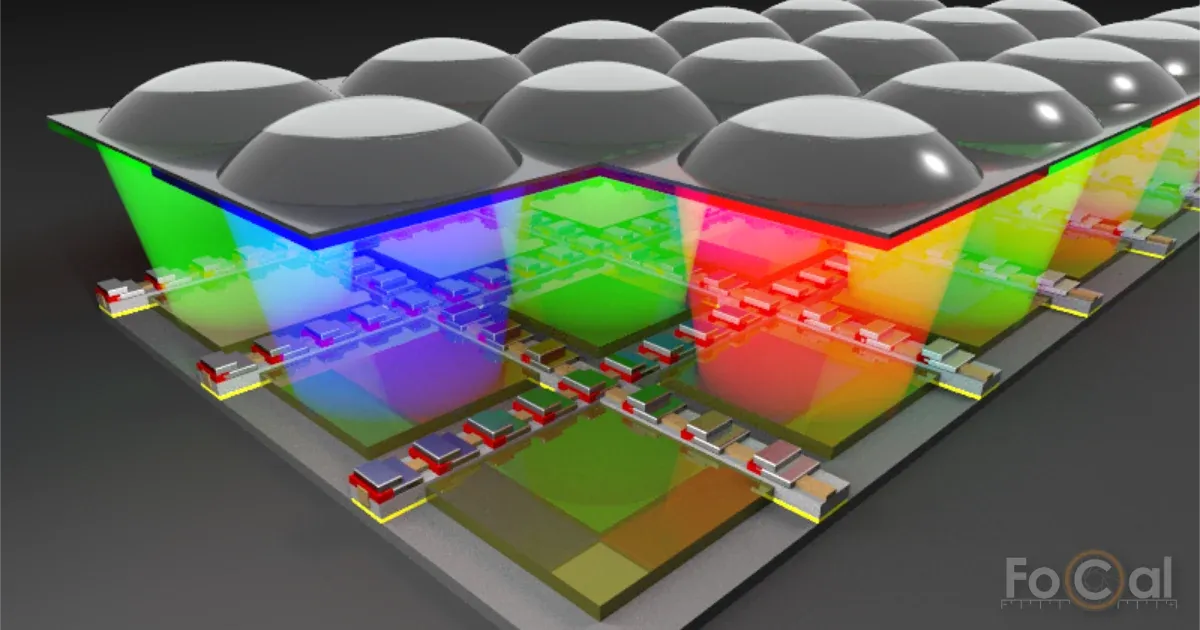 Why your Z5iic needs it · an illustrated guideYes, mirrorless autofocus needs calibrating tooNo separate AF sensor, so no need to calibrate? Not quite. The sensor, the lens and the AF processor, one at a time.Read the guide
FoCal can’t control the Z5iic, so you take the photos yourself and FoCal analyses the files.
The test space and camera settings below apply in File Mode too.
Each test tells you what to shoot. For calibration, that’s a set of shots at different AF Fine-Tune values.
Copy them to your computer and choose them in FoCal. It reads the settings from the files, analyses them and shows the results.
More in the File Mode help.
Press , open the menu and choose . The picture may be from a different camera.
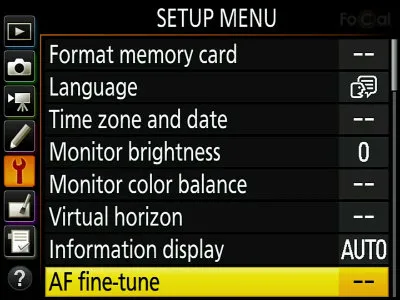
It’s to start with. Change it to : you only need to do this once.
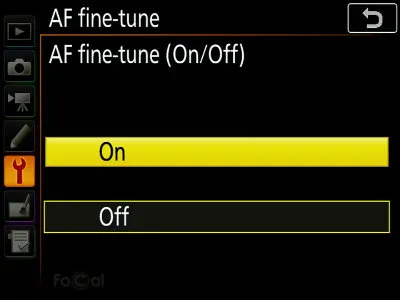
Select (or ): this sets the value for the lens on the camera now. Don’t change from 0, because that changes every lens.
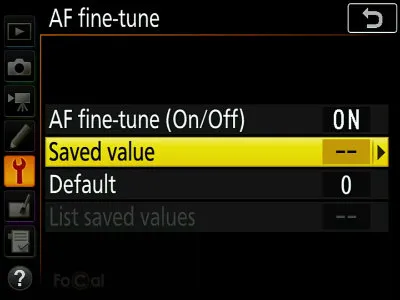
For a prime lens, change the value on the screen.
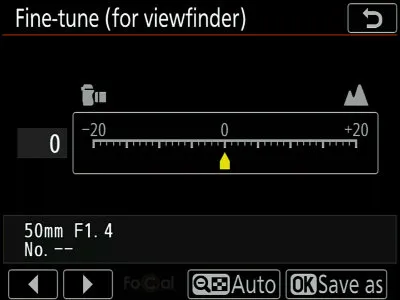
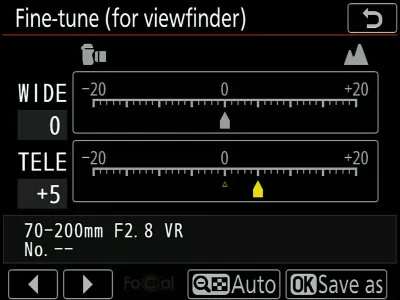
For a zoom lens, select or with up and down, as FoCal asks, then change the value with left and right.
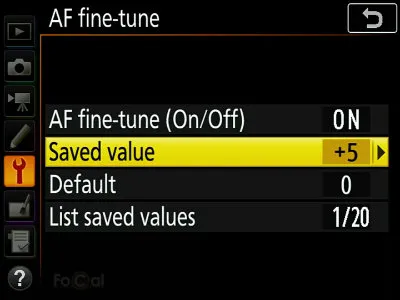
Press . You’re back on the previous screen: check that shows the value you set.
Use the camera hotkey: see User Assisted Mode.
Ground-floor rooms vibrate less when people move about or traffic passes, and vibration affects the results.
Keep it flat so it can’t move. A FoCal Hard Target is what we use for all our development and testing.
Avoid fluorescent and LED lights, which can flicker in a way you can’t see but the camera can, and changeable daylight. FoCal copes with small changes in light, not big ones.
If your tripod has a hook under the centre column, hang something heavy from it. With big lenses, mount the lens’s tripod collar, not the camera.
The Target Distance Tool in FoCal tells you how far from the target to be, with or without the camera connected.
Target Setup, FoCal’s guided setup, checks the position, light and settings before a test. More in the FoCal help.
Low batteries can make tests fail or the camera behave strangely.
Grips add vibration on a tripod.
Roughly is fine: Target Setup confirms the position.
If the Z5iic has a photo/video switch, set it to Photo.
If the camera lets you limit its options, allow Aperture Priority and Manual, Spot and Matrix/Evaluative metering, and all apertures, shutter speeds and ISO values.
Most FoCal tests use it. FoCal asks if a test needs something else.
Set the autofocus mode to : a half-press of the shutter button locks focus and then stops.
No automatic point selection: you should see one fixed AF point, in the centre.
FoCal may use the lens’s whole focus range, so set any focus limiter on the lens to off or the full range.
Turn off stabilisation on the lens and the Z5iic’s in-body stabilisation: it can make the results less accurate.
With the Z5iic, FoCal Plus gives you autofocus calibration, in File Mode. FoCal Pro adds AF Consistency, Aperture Sharpness and Dust Analysis, and History.
Quick and simple autofocus tuning.
Tune, analyse and compare. Everything you need for a Kit Health Check.