Skip to content
ReikanFoCal
  • Why FoCal
  • Products
  • Cameras
  • Learn
  • Blog
  • Support
  • Your account
Buy
  1. Home
  2. Help
  3. Snapshots help
  4. Other features
  5. Import a Snapshot

The Home screen

  • Snapshots Home

How to connect your camera

  • Camera Connection
  • Capture a Snapshot

Key screens

  • Snapshot Page
  • Settings Groups
  • Settings Details

Other features

  • Import a Snapshot
  • Export a Snapshot
  • Apply a Snapshot
  • Camera Monitoring

Demo limitations

  • Snapshots Demo Limitations

Snapshots

  • Snapshots help
  • Snapshots Support
  • FoCal help

No page titles match.

Other features

Import a Snapshot

Help page 4120Snapshots

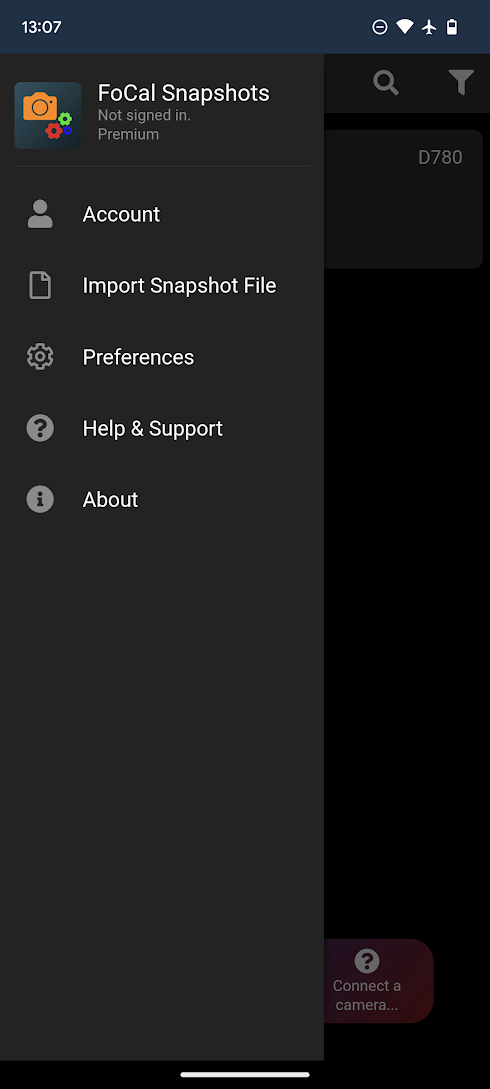
To import a Snapshot file, simply hit the Menu icon on the top right of the app to open the menu, then choose Import Snapshot File:
Further Topics

Export a Snapshot

Camera Connection

PreviousSnapshots HomeNext Export a Snapshot
ReikanFoCal

Reikan Technology is based on the south coast of the UK and has been making software for camera calibration and analysis since 2011.

Why FoCal

  • Why calibrate?
  • How autofocus goes wrong
  • Kit Health Check
  • How it works
  • FoCal IQ

Products

  • FoCal Desktop
  • FoCal Mobile
  • Snapshots
  • FoCal Commercial
  • Prices

Learn

  • Cameras
  • Test guides
  • Help
  • Target images
  • Blog

Support

  • Contact us
  • Technical specs
  • Renew support
  • Your account
  • Test centres
© 2026 Reikan Technology LtdPrivacy · Terms · About us