Settings – Calibration
On this page
The default settings suit almost everyone. The Settings tab lets you change how the calibration runs:
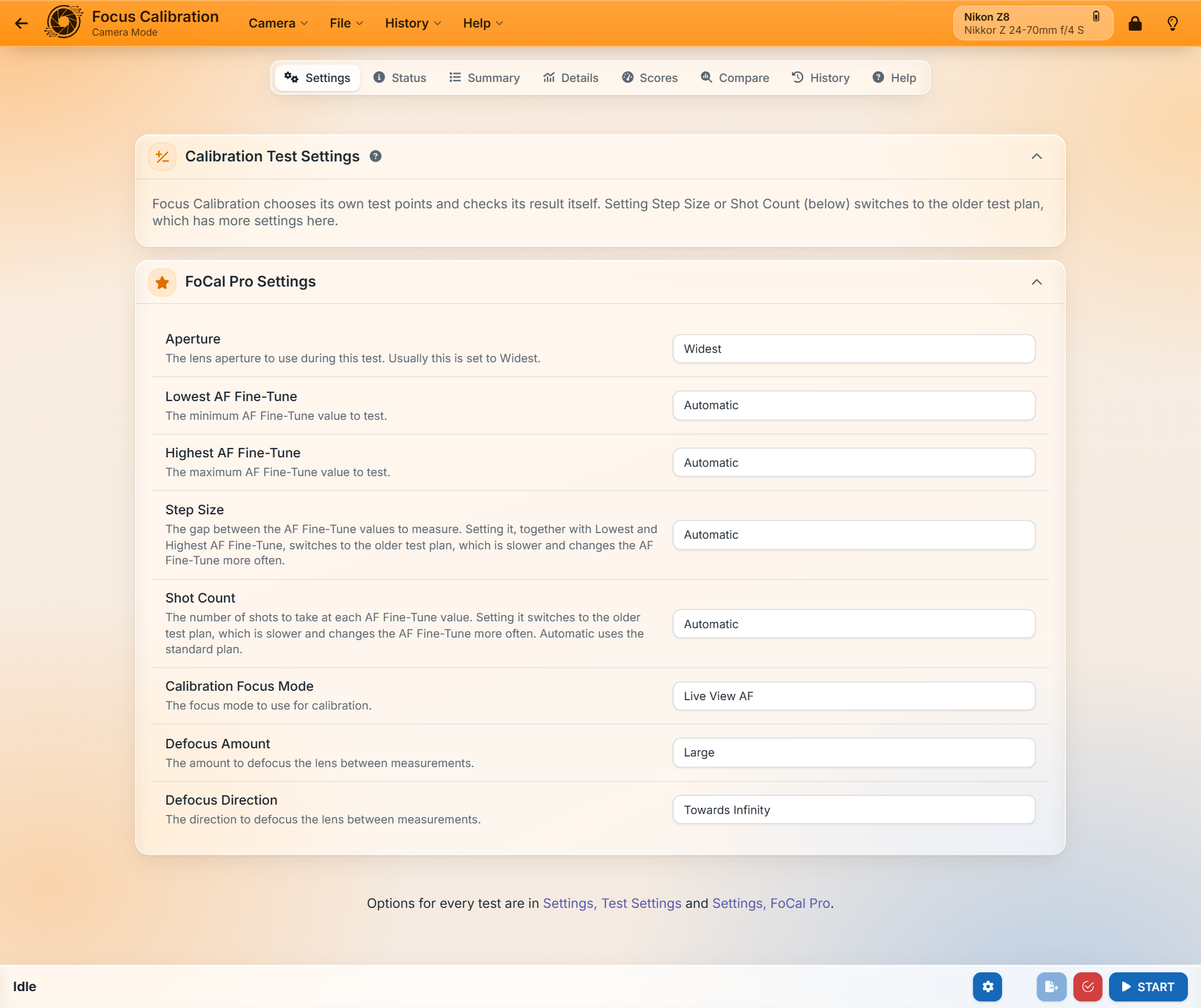
Options that apply to every test (such as Target Validation and the pre/post-shot alert) are in the main Settings, linked from the bottom of the tab.
Calibration Test Settings
Focus Calibration chooses its own test points and checks its result itself, so this card normally has no settings, only a note saying so.
Choosing a Shot Count, or a Step Size together with Lowest and Highest Focus Adjustment, in the FoCal Pro Settings card (below) switches to the older test plan. The older plan is slower and changes the Focus Adjustment more often. With it, this card shows two settings:
Result Check Level
At the end of the test FoCal takes a check shot at the result, to make sure it is as sharp as the test expects there. If the check shot misses, FoCal takes it again. This option sets how strict that check is. With the older test plan it also sets how many shots each Focus Adjustment value gets, when Shot Count is Automatic.
- None: no check at the result. Not recommended for normal use, but can be useful in some advanced cases.
- Normal: checks the result. This is the default.
- Tight: a strict check at the result. This takes longer.
With the standard test plan the check is fixed, so this setting isn't shown.
Test Point Amount
How many Focus Adjustment values the older test plan measures when Step Size is Automatic.
- 5 (A good spread of test points). This is the default.
- 8 (A higher number of test points).
- 10 (A very high number of test points).
More points take longer but give more detail on the Lens Profile - Focus Calibration chart.
FoCal Pro Settings
These settings need FoCal Pro. Without it they are shown but can't be changed.
Aperture
The aperture used for the test shots. The default is Widest, which is right for almost every calibration.
This may or may not change the aperture the camera focuses at. Most DSLRs focusing through the viewfinder (phase detect) always focus with the lens wide open, then stop down to take the shot. In Live View, and on mirrorless cameras, it depends on the camera and its settings.
Lowest / Highest Focus Adjustment
The names follow your camera's setting, for example Lowest AF Microadjustment and Highest AF Microadjustment.
A calibration normally tests the whole adjustment range. For example, if the camera's range is -20 to +20, FoCal measures at -20, +20 and several points in between.
Sometimes you may want to limit the range. For example, if the result is close to -20 and the shots at +20 are so blurred that FoCal can't recognise the target, you could test from -20 to 0 instead.
Leave both at Automatic (the default) to let FoCal choose. The standard test plan keeps to the range you set here.
Note: limiting the range can stop FoCal finding a valid result. Use the widest range you can, and centre it on where you expect the result. To begin with, choose values centred on 0 (for example -15 to +15, not -15 to 0).
Step Size
The gap between the Focus Adjustment values tested: Automatic (the default) or 1 to 10. Setting it, together with Lowest and Highest Focus Adjustment, switches to the older test plan. At Automatic, the older plan uses Test Point Amount to decide the gap.
Shot Count
The number of shots at each Focus Adjustment value: Automatic (the default) or 1 to 10. Automatic uses the standard test plan. Choosing a number switches to the older test plan and takes that many shots at every value.
Reorder Test Points
This setting only appears with the older test plan. It is off by default. When it's on, FoCal tests the two ends of the range and the middle first (for example -20, +20, 0 ...). You get a rough result within three measurements, and the test then refines it.
With User Assisted Mode cameras, this can mean a lot of scrolling through the adjustment setting on the camera. Leave it off to test the values in order (for example -20, -10, 0, +10, +20), which needs less changing on the camera.
Calibration Focus Mode
This only appears if the camera can calibrate more than one autofocus system (for example the viewfinder and Live View on the Nikon D780). Choose the system to calibrate.
Defocus Amount / Defocus Direction
To make the autofocus work for every shot, FoCal defocuses the lens between shots. These options set how far (None, Small or Large) and in which direction (Towards Infinity or Towards Camera). The defaults are Large and Towards Infinity. Defocus Direction is unavailable when the amount is None.
Changing these can reveal interesting behaviour in the autofocus system. Unless you understand the effects well, leave them at Large and Towards Infinity.